fun main(args: Array<String>) {
    var array = arrayOf("one", "two", "three", "four")
    for(str in array) {
        println("value = " + str)
    }
}
This produces the following output:value = one value = two value = three value = four
fun main(args: Array<String>) {
var array = arrayOf("one", "two", "three", "four")
for(str in array) {
println("value = " + str)
}
}
This produces the following output:value = one value = two value = three value = four


using System.Collections;
using System.Collections.Generic;
using System.IO;
using System.Runtime.InteropServices;
using UnityEngine;

public class Share : MonoBehaviour {
 public string title;
 public string bodyText;

 public void SaveAndShareImage() {
  string destination = Path.Combine(Application.persistentDataPath, "test.png");
  SaveImage (destination);
  ShareImage (destination, title,
   bodyText);
 }

 void ShareImage(string imageLocation, string titleText, string bodyText) {
  #if UNITY_IOS
  CallSocialShareAdvanced(bodyText, titleText, "", imageLocation);
  #endif

  #if UNITY_ANDROID
  AndroidJavaClass intentClass = new AndroidJavaClass("android.content.Intent");
  AndroidJavaObject intentObject = new AndroidJavaObject("android.content.Intent");
  intentObject.Call("setAction", intentClass.GetStatic("ACTION_SEND"));
  AndroidJavaClass uriClass = new AndroidJavaClass("android.net.Uri");
  AndroidJavaObject uriObject = uriClass.CallStatic("parse","file://" + imageLocation);
  intentObject.Call("putExtra", intentClass.GetStatic("EXTRA_STREAM"), uriObject);
  intentObject.Call("putExtra", intentClass.GetStatic("EXTRA_TEXT"), bodyText);
  intentObject.Call("putExtra", intentClass.GetStatic("EXTRA_SUBJECT"), titleText);
  intentObject.Call("setType", "image/jpeg");
  AndroidJavaClass unity = new AndroidJavaClass("com.unity3d.player.UnityPlayer");
  AndroidJavaObject currentActivity = unity.GetStatic("currentActivity");

  currentActivity.Call("startActivity", intentObject);
  #endif
 }

 void SaveImage(string destination) {
  Texture2D screenTexture = new Texture2D(Screen.width, Screen.height, TextureFormat.RGB24, true);
  screenTexture.ReadPixels(new Rect(0, 0, Screen.width, Screen.height),0,0);
  screenTexture.Apply();
  byte[] dataToSave = screenTexture.EncodeToPNG();
  File.WriteAllBytes(destination, dataToSave);
 }

 #if UNITY_IOS
 public struct ConfigStruct
 {
  public string title;
  public string message;
 }

 [DllImport ("__Internal")] private static extern void showAlertMessage(ref ConfigStruct conf);

 public struct SocialSharingStruct
 {
  public string text;
  public string url;
  public string image;
  public string subject;
 }

 [DllImport ("__Internal")] private static extern void showSocialSharing(ref SocialSharingStruct conf);

 public static void CallSocialShare(string title, string message)
 {
  ConfigStruct conf = new ConfigStruct();
  conf.title  = title;
  conf.message = message;
  showAlertMessage(ref conf);
 }


 public static void CallSocialShareAdvanced(string defaultTxt, string subject, string url, string img)
 {
  SocialSharingStruct conf = new SocialSharingStruct();
  conf.text = defaultTxt;
  conf.url = url;
  conf.image = img;
  conf.subject = subject;

  showSocialSharing(ref conf);
 }
 #endif
}
Plugins/iOS/iOSNativeShare.h
Plugins/iOS/iOSNativeShare.m
Then make sure that these files have the following Objective C code. The following code was taken from https://github.com/ChrisMaire/unity-native-sharing Plugins/iOS/iOSNativeShare.h
#import "UnityAppController.h"

@interface iOSNativeShare : UIViewController
{
    UINavigationController *navController;
}


struct ConfigStruct {
    char* title;
    char* message;
};

struct SocialSharingStruct {
    char* text;
    char* url;
    char* image;
    char* subject;
};


#ifdef __cplusplus
extern "C" {
#endif

    void showAlertMessage(struct ConfigStruct *confStruct);
    void showSocialSharing(struct SocialSharingStruct *confStruct);

#ifdef __cplusplus
}
#endif


@end
#import "iOSNativeShare.h"

@implementation iOSNativeShare{
}

#ifdef UNITY_4_0 || UNITY_5_0

#import "iPhone_View.h"

#else

extern UIViewController* UnityGetGLViewController();

#endif

+(id) withTitle:(char*)title withMessage:(char*)message{

 return [[iOSNativeShare alloc] initWithTitle:title withMessage:message];
}

-(id) initWithTitle:(char*)title withMessage:(char*)message{

 self = [super init];

 if( !self ) return self;

 ShowAlertMessage([[NSString alloc] initWithUTF8String:title], [[NSString alloc] initWithUTF8String:message]);

 return self;

}

void ShowAlertMessage (NSString *title, NSString *message){

 UIAlertView *alert = [[UIAlertView alloc] initWithTitle:title

                       message:message

                       delegate:nil

                       cancelButtonTitle:@"OK"

                       otherButtonTitles: nil];

 [alert show];

}

+(id) withText:(char*)text withURL:(char*)url withImage:(char*)image withSubject:(char*)subject{

 return [[iOSNativeShare alloc] initWithText:text withURL:url withImage:image withSubject:subject];
}

-(id) initWithText:(char*)text withURL:(char*)url withImage:(char*)image withSubject:(char*)subject{

 self = [super init];

 if( !self ) return self;


    NSString *mText = text ? [[NSString alloc] initWithUTF8String:text] : nil;

    NSString *mUrl = url ? [[NSString alloc] initWithUTF8String:url] : nil;

    NSString *mImage = image ? [[NSString alloc] initWithUTF8String:image] : nil;

    NSString *mSubject = subject ? [[NSString alloc] initWithUTF8String:subject] : nil;


 NSMutableArray *items = [NSMutableArray new];

 if(mText != NULL && mText.length > 0){

  [items addObject:mText];

 }

 if(mUrl != NULL && mUrl.length > 0){

  NSURL *formattedURL = [NSURL URLWithString:mUrl];

  [items addObject:formattedURL];

 }
 if(mImage != NULL && mImage.length > 0){

  if([mImage hasPrefix:@"http"])
  {
   NSURL *urlImage = [NSURL URLWithString:mImage];

            NSError *error = nil;
            NSData *dataImage = [NSData dataWithContentsOfURL:urlImage options:0 error:&error];

            if (!error) {
                UIImage *imageFromUrl = [UIImage imageWithData:dataImage];
                [items addObject:imageFromUrl];
            } else {
                ShowAlertMessage(@"Error", @"Cannot load image");
            }
        }
        else if ( [self isStringValideBase64:mImage]){
            NSData* imageBase64Data = [[NSData alloc]initWithBase64Encoding:mImage];
            UIImage* image = [UIImage imageWithData:imageBase64Data];
            if (image!= nil){
                [items addObject:image];
            }
            else{
                ShowAlertMessage(@"Error", @"Cannot load image");
            }
        }
        else{
   NSFileManager *fileMgr = [NSFileManager defaultManager];
   if([fileMgr fileExistsAtPath:mImage]){

    NSData *dataImage = [NSData dataWithContentsOfFile:mImage];

    UIImage *imageFromUrl = [UIImage imageWithData:dataImage];

    [items addObject:imageFromUrl];
   }else{
    ShowAlertMessage(@"Error", @"Cannot find image");
   }
  }
 }

 UIActivityViewController *activity = [[UIActivityViewController alloc] initWithActivityItems:items applicationActivities:Nil];

    if(mSubject != NULL) {
        [activity setValue:mSubject forKey:@"subject"];
    } else {
        [activity setValue:@"" forKey:@"subject"];
    }

 UIViewController *rootViewController = UnityGetGLViewController();
    //if iPhone
    if (UI_USER_INTERFACE_IDIOM() == UIUserInterfaceIdiomPhone) {
          [rootViewController presentViewController:activity animated:YES completion:Nil];
    }
    //if iPad
    else {
        // Change Rect to position Popover
        UIPopoverController *popup = [[UIPopoverController alloc] initWithContentViewController:activity];
        [popup presentPopoverFromRect:CGRectMake(rootViewController.view.frame.size.width/2, rootViewController.view.frame.size.height/4, 0, 0)inView:rootViewController.view permittedArrowDirections:UIPopoverArrowDirectionAny animated:YES];
    }
    return self;
}

-(BOOL) isStringValideBase64:(NSString*)string{

    NSString *regExPattern = @"^(?:[A-Za-z0-9+/]{4})*(?:[A-Za-z0-9+/]{2}==|[A-Za-z0-9+/]{3}=)?$";

    NSRegularExpression *regEx = [[NSRegularExpression alloc] initWithPattern:regExPattern options:NSRegularExpressionCaseInsensitive error:nil];
    NSUInteger regExMatches = [regEx numberOfMatchesInString:string options:0 range:NSMakeRange(0, [string length])];
    return regExMatches != 0;
}

# pragma mark - C API
iOSNativeShare* instance;

void showAlertMessage(struct ConfigStruct *confStruct) {
 instance = [iOSNativeShare withTitle:confStruct->title withMessage:confStruct->message];
}

void showSocialSharing(struct SocialSharingStruct *confStruct) {
 instance = [iOSNativeShare withText:confStruct->text withURL:confStruct->url withImage:confStruct->image withSubject:confStruct->subject];
}

@end
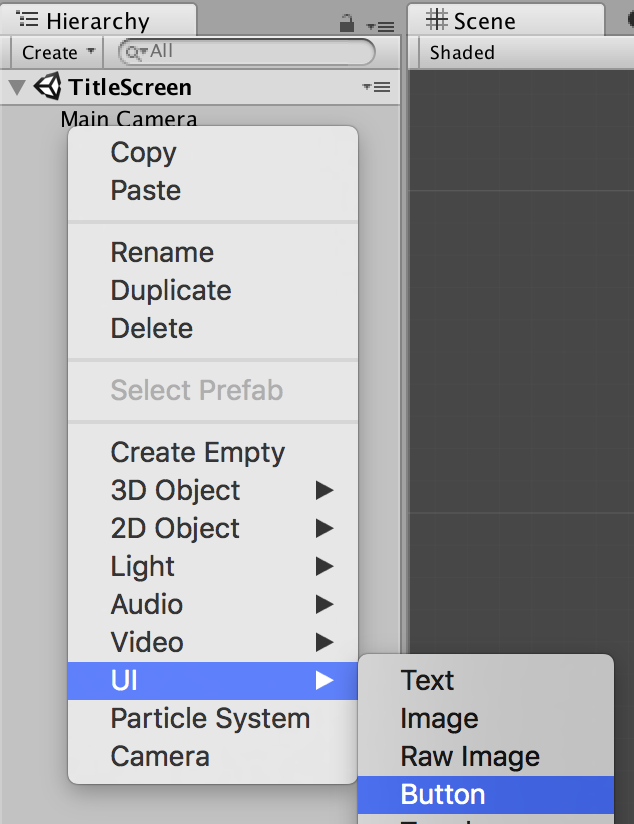


mkdir <project name>
cd <project name>
git init --bare
git clone ssh://<username>@<raspberry pi ip or hostname>:<path to repo>/<repo name>
git push origin master


using UnityEngine;
using System.Collections;
using System.Collections.Generic;

/***
 * Programatically generate a list of GameObjects at random positions
 * between xOffset to xLength, yOffset to yLength and zOffset to zLength.
 */
public class GameObjectGenerator : MonoBehaviour {

 /***
  * The maximum number of objects to get generated
  */
 public int maxObjects = 10;

 /***
  * The type of game object to generate
  */
 public GameObject generatedObjectType;

 /***
  * The x-axis offset to position the game objects
  */
 public float xOffset = 0f;
 /***
  * The y-axis offset to position the game objects
  */
 public float yOffset = 0f;
 /***
  * The z-axis offset to position the game objects
  */
 public float zOffset = 0f;

 /***
  * The length of the level on the x-axis
  */
 public float xLength = 10f;
 /***
  * The length of the level on the y-axis
  */
 public float yLength = 10f;
 /***
  * The length of the level on the z-axis
  */
 public float zLength = 10f;

 /***
  * Internal list of all the generated game objects.
  */
 private List gameObjects;

 void Start () {
  gameObjects = new List();
  generateGameObjects ();
 }

 public void generateGameObjects() {
  for (int i = 0; i < maxObjects; i++) {
   //get a random value between the offset and the length
   float xPos = Mathf.Clamp(xOffset + Random.value * xLength, xOffset, xLength);
   float yPos = Mathf.Clamp(yOffset + Random.value * yLength, yOffset, yLength);
   float zPos = Mathf.Clamp(zOffset + Random.value * zLength, zOffset, zLength);

   Vector3 position = new Vector3 (xPos, yPos, zPos);

   GameObject gameObject = (GameObject)Instantiate (generatedObjectType, position, Quaternion.identity);
   gameObjects.Add(gameObject);
  }
 }
}

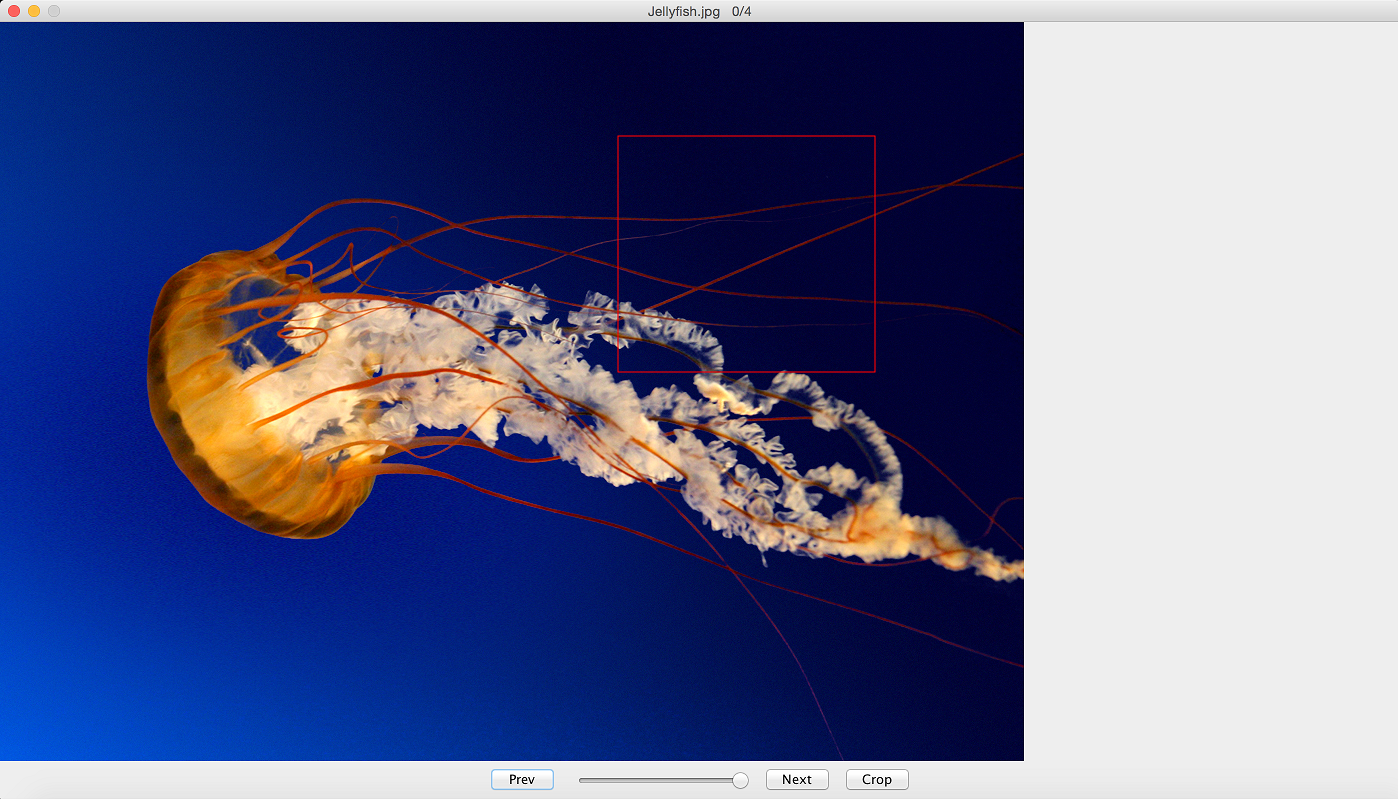
package photocropper;

import java.awt.BorderLayout;
import java.awt.Dimension;
import java.awt.event.ActionEvent;
import java.awt.image.BufferedImage;
import java.io.File;
import java.io.IOException;
import java.util.ArrayList;

import javax.swing.JButton;
import javax.swing.JFileChooser;
import javax.swing.JFrame;
import javax.swing.JOptionPane;
import javax.swing.JPanel;
import javax.swing.JSlider;
import javax.swing.event.ChangeEvent;

/***
 * This is the main class of the application. It constructs the UI and
 * registers event listeners,
 * @author andrew
 *
 */
public class PhotoCropper {

	private ArrayList photos;
	private int currentImageIndex = -1;
	private String directory;

	public PhotoCropper() throws Exception {
		frame = new JFrame();
		panel = new ImagePanel();

		while((directory = getPhotoDirectory()) == null) {
			System.err.println("This application needs to have a photo directory. Exiting...");
			System.exit(1);
		}

		String[] files = Utils.getFiles(directory);

		ArrayList fileList = Utils.toArrayList(files);
		Utils.filterNonImages(fileList);
		photos = fileList;

		panel.setOutputDirectory(directory + File.separator + "cropped");

		CropMouseListener cropListener = new CropMouseListener(panel);
		panel.addMouseListener(cropListener);
		panel.addMouseMotionListener(cropListener);

		if(photos.size() > 0) {
			BufferedImage img = Utils.loadImage(directory, photos.get(0));
			frame.setTitle(photos.get(0)+ "\t" + 0 + "/" + photos.size());
			currentImageIndex = 0;
			panel.changeImage(img);
		}

		JPanel controlPanel = new JPanel();

		btnNext = new JButton("Next");
		btnPrev = new JButton("Prev");
		btnCrop = new JButton("Crop");

		sliderZoom = new JSlider(1, 100);
		sliderZoom.setValue(100);
		setUpListeners();
		controlPanel.add(btnPrev);
		controlPanel.add(sliderZoom);
		controlPanel.add(btnNext);
		controlPanel.add(btnCrop);

		//set resizeable to false so the resize will not interfere
		//when interacting with images close to the border
		frame.setResizable(false);

		frame.add(controlPanel, BorderLayout.SOUTH);

		frame.add(panel, BorderLayout.CENTER);

		frame.setSize(new Dimension(1400,800));
		frame.setDefaultCloseOperation(JFrame.EXIT_ON_CLOSE);
		frame.setVisible(true);
	}

	/***
	 *
	 * @return
	 */
	public String getPhotoDirectory() {
		JFileChooser fileChooser = new JFileChooser();
		String dir = null;
		fileChooser.setDialogTitle("Select Photo Directory");

		fileChooser.setFileSelectionMode(JFileChooser.DIRECTORIES_ONLY);

		int returnVal = fileChooser.showOpenDialog(frame);
		if (returnVal == JFileChooser.APPROVE_OPTION) {
			dir = fileChooser.getSelectedFile().getAbsolutePath();
		}

		return dir;
	}

	public void setUpListeners() {
		btnNext.addActionListener((ActionEvent evt) -> {
			if((currentImageIndex + 1) >= photos.size()) {
				currentImageIndex = 0;
			}
			else {
				currentImageIndex++;
			}

			try {
				BufferedImage prevImage = Utils.loadImage(directory, photos.get(currentImageIndex));
				frame.setTitle(photos.get(currentImageIndex) + "\t" + currentImageIndex + "/" + photos.size());
				panel.changeImage(prevImage);
				frame.repaint();
			}
			catch(IOException e) {
				System.err.println("ERROR: could not load " + photos.get(currentImageIndex));
				e.printStackTrace();
			}
		});

		btnPrev.addActionListener((ActionEvent evt) -> {
			if((currentImageIndex - 1) < 0) {
				currentImageIndex = photos.size() -1;
			}
			else {
				currentImageIndex--;
			}

			try {
				BufferedImage prevImage = Utils.loadImage(directory, photos.get(currentImageIndex));
				frame.setTitle(photos.get(currentImageIndex) + "\t" + currentImageIndex + "/" + photos.size());
				panel.changeImage(prevImage);
				frame.repaint();
			}
			catch(IOException e) {
				System.err.println("ERROR: could not load " + photos.get(currentImageIndex));
				e.printStackTrace();
			}
		});

		btnCrop.addActionListener((ActionEvent evt) -> {
			try{
				panel.crop();
			}
			catch(Exception e) {
				JOptionPane.showMessageDialog(frame,
					    "Could not crop image. Bad image selection",
					    "Crop Error",
					    JOptionPane.ERROR_MESSAGE);
			}
		});

		sliderZoom.addChangeListener((ChangeEvent e) -> {
			double value = sliderZoom.getValue();
			double zoom = value / 100.0;
			panel.setZoom(zoom);
		});
	}

	public static void main(String[] args) {
		try {
			new PhotoCropper();
		}
		catch(Exception e) {
			e.printStackTrace();
		}
	}

	private JButton btnNext;
	private JButton btnPrev;
	private JButton btnCrop;
	private JSlider sliderZoom;
	private ImagePanel panel;
	private JFrame frame;
}
package photocropper;

import java.awt.Color;
import java.awt.Graphics;
import java.awt.Graphics2D;
import java.awt.geom.AffineTransform;
import java.awt.image.BufferedImage;
import java.io.File;
import java.io.IOException;

import javax.imageio.ImageIO;
import javax.swing.JPanel;

/***
 * This component displays the image.
 * It also has functionality to crop the image.
 *
 * @author andrew
 *
 */
public class ImagePanel extends JPanel {

	private double zoom;
	private double scale;

	/**
	 *
	 */
	private static final long serialVersionUID = -2179167993341600319L;

	private BufferedImage displayImage;
	private CropBox cropBox;
	private String dir;

	public ImagePanel() {
		cropBox = new CropBox(0, 0, 0, 0);
		zoom = 1.0;
		scale = 1.0;
		dir = "";
	}

	/***
	 * Change the image that is displayed in the panel
	 * @param image
	 */
	public void changeImage(BufferedImage image) {
		displayImage = image;
	}

	/***
	 * Set the first coordinate of the crop box.
	 * This is the top corner of the crop box
	 * @param x
	 * @param y
	 */
	public void setFirstCoord(int x, int y) {
		cropBox.x = x;
		cropBox.y = y;
		this.repaint();
	}

	/***
	 * Set the second coordinate of the crop box.
	 * This is the bottom corner of the crop box.
	 * @param x
	 * @param y
	 */
	public void setSecondCoord(int x, int y) {
		cropBox.width = x - cropBox.x;
		cropBox.height = y - cropBox.y;
		this.repaint();
	}

	/***
	 * Set the size of the crop box
	 * @param width
	 * @param height
	 */
	public void setCropBoxSize(int width, int height) {
		cropBox.width = width;
		cropBox.height = height;
		this.repaint();
	}

	/***
	 * Set the zoom. This allows zooming in and out of the display image
	 * @param zoom
	 */
	public void setZoom(double zoom) {
		this.zoom = zoom;
		this.scale = 1 / zoom;
		this.repaint();
	}

	/***
	 * Draw the component.
	 * Draw the image then superimpose the cropbox on top of it.
	 */
	@Override
	public void paintComponent(Graphics graphics) {
		Graphics2D g = (Graphics2D) graphics;

		if(displayImage != null) {
			AffineTransform at = new AffineTransform();
			at.setToScale(zoom, zoom);
			g.drawImage(displayImage, at, this);
		}
		else {
			g.drawString("Image Not Available", (int)(getWidth()/2.5), getHeight()/2);
		}

		if(cropBox != null) {
			Color oldColor = g.getColor();
			g.setColor(cropBox.color);
			g.drawRect(cropBox.x, cropBox.y, cropBox.width, cropBox.height);

			g.setColor(oldColor);
		}
	}

	/***
	 * Crop the image selection and save to file
	 * @throws Exception
	 */
	public void crop() throws Exception {
		try{
			if(displayImage == null) {
				System.err.println("ERROR: No image to crop");
				return;
			}

			File outFile = new File(dir +   File.separator + System.currentTimeMillis() + ".png");

			//get the crop box coords with respect to the zoom property
			int x = (int)(cropBox.x * scale);
			int y = (int)(cropBox.y * scale);
			int width = (int)(cropBox.width *scale);
			int height = (int)(cropBox.height * scale);

			//reset for bad input
			if(x < 0) x = 0;
			if(y < 0) y = 0;
			if(width < 0) width = 0;
			if(height < 0) height = 0;

			//correct the width if it is out of bounds
			if((x + width) > displayImage.getWidth()) {
				width = displayImage.getWidth() - x;
			}

			//correct the height if it is out of bounds
			if((y + height) > displayImage.getHeight()) {
				height = displayImage.getHeight() - y;
			}

			//throw exception if selection is not in the image at all
			if(x > displayImage.getWidth()) {
				throw new Exception("Image selection is out of bounds");
			}
			if(y > displayImage.getHeight()) {
				throw new Exception("Image selection is out of bounds");
			}

			//crop the sub image to save
			BufferedImage img = displayImage.getSubimage(x, y,
					width, height);

			//check for the destination directory, create it if it doesn't exist
			File outputDir = new File(dir);
			if(!outputDir.isDirectory()) {
				System.out.println("Output directory does not exist, creating: "
						+ outputDir.getAbsolutePath());
				outputDir.mkdir();
			}

			ImageIO.write(img, "png", outFile);
		}
		catch (IOException e) {
			System.err.println("Could not save to file. Check directory permissions");
		}
	}

	/***
	 * Set the save directory
	 * @param dir
	 */
	public void setOutputDirectory(String dir) {
		this.dir = dir;
	}

	/***
	 * CropBox contains the properties of the cropping box
	 * @author andrew
	 */
	private class CropBox {
		private int x, y, width, height;
		private Color color;

		public CropBox(int x, int y, int width, int height) {
			this.x = x;
			this.y = y;
			this.width = width;
			this.height = height;
			this.color = Color.RED;
		}
	}
}
package photocropper;

import java.awt.event.MouseEvent;
import java.awt.event.MouseListener;
import java.awt.event.MouseMotionListener;

/***
 * This listens to mouse events and sets the coordinates
 * of the bounding box of the crop.
 *
 * @author andrew
 */
public class CropMouseListener implements MouseListener, MouseMotionListener {
	private ImagePanel panel;

	public CropMouseListener(ImagePanel panel) {
		this.panel = panel;
	}

	@Override
	public void mouseReleased(MouseEvent e) {
		if(panel != null) {
			panel.setSecondCoord(e.getX(), e.getY());
		}
	}

	/***
	 * If right click, zero out any existing box
	 */
	@Override
	public void mousePressed(MouseEvent e) {
		if(panel != null) {
			panel.setCropBoxSize(0, 0);

			if(e.getButton() == MouseEvent.BUTTON3) {
				panel.setFirstCoord(0, 0);
				panel.setSecondCoord(e.getX(), e.getY());
				return;
			}

			panel.setFirstCoord(e.getX(), e.getY());
		}
	}

	@Override
	public void mouseDragged(MouseEvent e) {
		//TODO - this only works for positive width and height
		//rework this so that it accommodates for both
		//negative width and height
		panel.setSecondCoord(e.getX(), e.getY());
	}

	@Override
	public void mouseExited(MouseEvent e) {
		//Not interested in this event
	}

	@Override
	public void mouseEntered(MouseEvent e) {
		//Not interested in this event
	}

	@Override
	public void mouseClicked(MouseEvent e) {
		//Not interested in this event
	}

	@Override
	public void mouseMoved(MouseEvent e) {
		//Not interested in this event
	}
}
package photocropper;

import java.awt.image.BufferedImage;
import java.io.File;
import java.io.IOException;
import java.util.ArrayList;

import javax.imageio.ImageIO;

/***
 * Some utilities used in the photo cropper
 * @author andrew
 *
 */
public class Utils {

	/***
	 * Load an image from file
	 * @param directory the directory path to the image
	 * @param filename the filename of the image
	 * @return the image in memory
	 * @throws IOException Thrown if cannot open the image
	 */
	public static BufferedImage loadImage(String directory, String filename)
			throws IOException {
		BufferedImage image = null;
		String dir = "";

		if(!directory.endsWith("/")) {
			dir = directory + "/";
		}
		else {
			dir = directory;
		}

		File file = new File(dir + filename);
		try{
			image = ImageIO.read(file);
		}
		catch(IOException e) {
			System.err.println("cannot open file " + file.getAbsolutePath() + e.getLocalizedMessage());
			throw e;
		}
		return image;
	}

	/***
	 * Get the names of all the files in a directory
	 * @param dirName The path of the directory
	 * @return a list of the files in a directory
	 */
	public static String[] getFiles(String dirName) {
		File dir = new File(dirName);

		if(dir.isDirectory()) {
			String[] files = dir.list();

			return files;
		}
		return null;
	}

	/***
	 * Helper method to convert an array to an arraylist
	 * @param array The array to convert
	 * @return returns the contents of the array in an arraylist format
	 */
	public static ArrayList toArrayList(String[] array) {
		ArrayList list = new ArrayList<>();

		for(String item: array) {
			list.add(item);
		}
		return list;
	}

	/***
	 * Get the file extension from a filename.
	 * This works by getting the last occurrence of the dot
	 * and extracting the characters after it.
	 * If test.txt is passed in, the string txt is returned.
	 * @param file The name of the file
	 * @return the file extension
	 */
	public static String getExtension(String file) {
		String extension = null;

		if(file == null) {
			return null;
		}

		int indexOfDot = file.lastIndexOf(".");

		if(indexOfDot != -1) {
			extension = file.substring(indexOfDot + 1);
		}

		return extension;
	}

	/***
	 * Loop through a file list and remove any non-images.
	 * @param fileList
	 */
	public static void filterNonImages(ArrayList fileList) {
		ArrayList fileToBeRemoved = new ArrayList<>();

		//store list of which files need to be filtered out
		for(String file: fileList) {
			if(!isImage(file)) {
				fileToBeRemoved.add(file);
			}
		}

		//filter out files from the original list
		for(String file: fileToBeRemoved) {
			fileList.remove(file);
		}
	}

	/***
	 * Check if the file is an image.
	 * This is done based on the file extension
	 * @param filename
	 * @return
	 */
	public static boolean isImage(String filename) {
		String[] imageExtensions = {"png", "jpg"};

		String extension = getExtension(filename);

		if(extension == null) {
			return false;
		}

		for(String ext: imageExtensions) {
			if(ext.equals(extension.toLowerCase())) {
				return true;
			}
		}

		return false;
	}
}
